Skip to content
  • Home
  • Branches
    • Branches User Guide
  • Centre Proprietors
    • Centre User Guides
  • Centre Coordinators
    • Centre Coordinators User Guides
  • Area Reps
    • Area Reps User Guide
  • User Guides
  • Events
  • Support

PELHAM Basics

3
  • Accessing PELHAM
  • Accessing PELHAM – Area Representatives
  • Accessing Pelham on Mobile & Tablet

Branches

3
  • Accessing PELHAM – Branches
  • Updating Branch Committees
  • Member Approvals

Centres

2
  • Accessing PELHAM – Centres
  • How to view Centre Coaches

Coaches and Volunteers

7
  • Coach Types
  • The Coach Agreement
  • Coach Certifications
  • Assessors
  • Adding Coach Qualifications
  • How to Deactivate a Coach Qualification
  • How to add CPD Activities

Events

7
  • Reporting on Events in PELHAM
  • Online Booking Systems
  • My Riding Life – The Pony Club
  • Horse Events – The Pony Club
  • Horse Monkey – The Pony Club
  • Entrymaster – The Pony Club
  • Adding a new event

Achievements

3
  • Achievements – Basics
  • Deactivating Achievments
  • Achievements – Bulk Upload

Contacts

5
  • What is a Contact?
  • How to Create a Contact
  • Contacts – Membership Tab
  • Update Contact Email Address
  • Sending Emails from PELHAM

Views & Reporting

3
  • Searching and Views
  • Exporting Data from PELHAM
  • Creating a new view
View Categories
  • Home
  • Pelham Support Guides
  • Contacts
  • Update Contact Email Address

Update Contact Email Address

If you would like to change an email address in Pelham please firstly check on the child/members record to see if the email already exists there. If it does you will need to delete this before trying to add to the member administrator’s record.

To change an email address for a Member Administrator

1 – Find the member administrators record

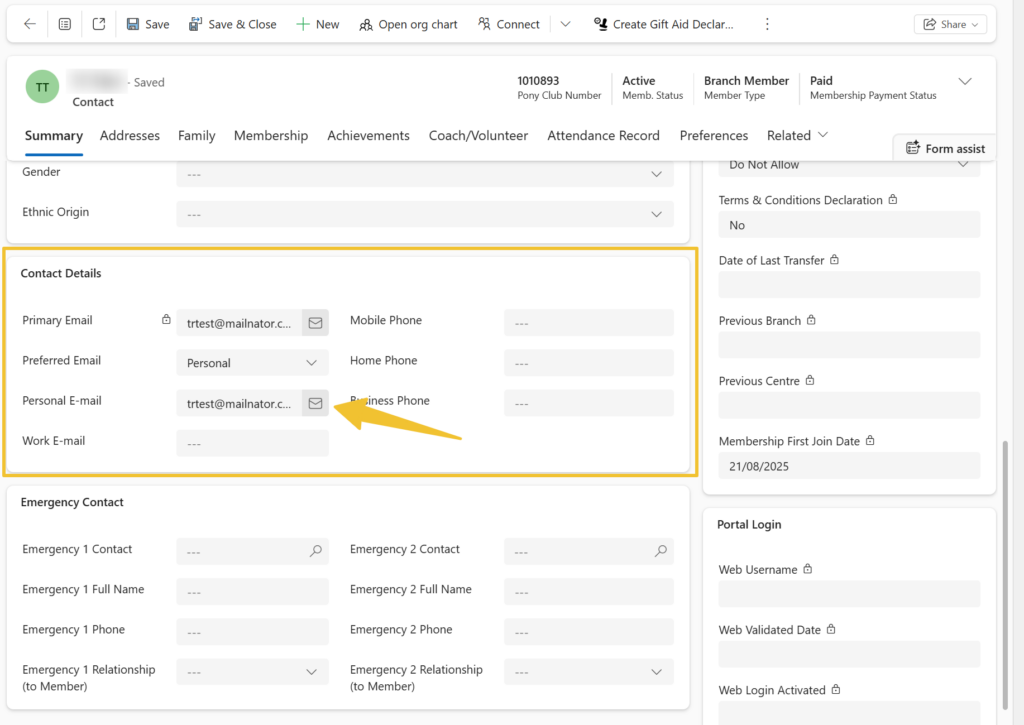
2 – Scroll down to the ‘Contact Details’

3 – Click in the box for ‘Personal E-mail’

4 – Remove the current address by pressing backspace to delete

5 – Enter the new email address into the ‘Personal E-mail’

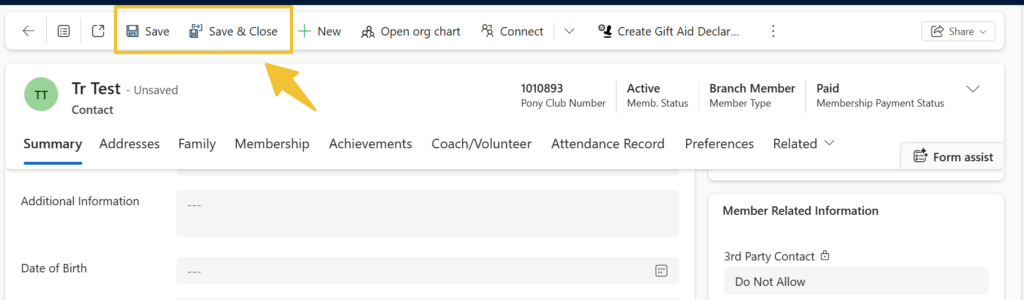
6 – Then Save the record
    If you see an error message pop up, this means the email address already exists in PELHAM and will not let you save the record until the duplicate email address has been removed.

    You will need to remove the email address from the record you are already on and find where else it already exists in PELHAM; this is most likely to be on the member’s record.

    Updated on 9 December 2025

    What are your Feelings

    Share This Article :

    • Facebook
    • X
    • LinkedIn
    • Pinterest
    Sending Emails from PELHAMHow to Create a Contact

    Copyright © 2025 The Pony Club Registered Charity No: 1050146 | Incorporated as a Company Limited By Guarantee Registered in England No: 3072475