
• Home
  • Branches
    • Branches User Guide
  • Centre Proprietors
    • Centre User Guides
  • Centre Coordinators
    • Centre Coordinators User Guides
  • Area Reps
    • Area Reps User Guide
  • Training Documents
  • Events
  • Support

PELHAM Basics

5
  • Accessing PELHAM
  • Accessing PELHAM – Branches
  • Accessing PELHAM – Centres
  • Accessing PELHAM – Area Representatives
  • Accessing Pelham on Mobile & Tablet

Achievements

2
  • Achievements – Basics
  • Achievements – Bulk Upload

Contacts

4
  • What is a Contact?
  • Contacts – Membership Tab
  • Member Approvals
  • Sending Emails from PELHAM

Coaches and Volunteers

2
  • The Coach Agreement
  • CPD & PELHAM Explained

Events

1
  • Adding a new event

Views & Reporting

3
  • Searching and Views
  • Exporting Data from PELHAM
  • Creating a new view
View Categories
  • Home
  • Pelham Support Guides
  • Views & Reporting
  • Exporting Data from PELHAM

Exporting Data from PELHAM

How to export data from PELHAM into Excel

Data can be exported from PELHAM from a variety of views depending on the information you are looking for.

Some useful data sets to export are:

  • Contacts
  • Current Members
  • Active Coaches
  • Achievement History

1 – Select a view from PELHAM to export data from

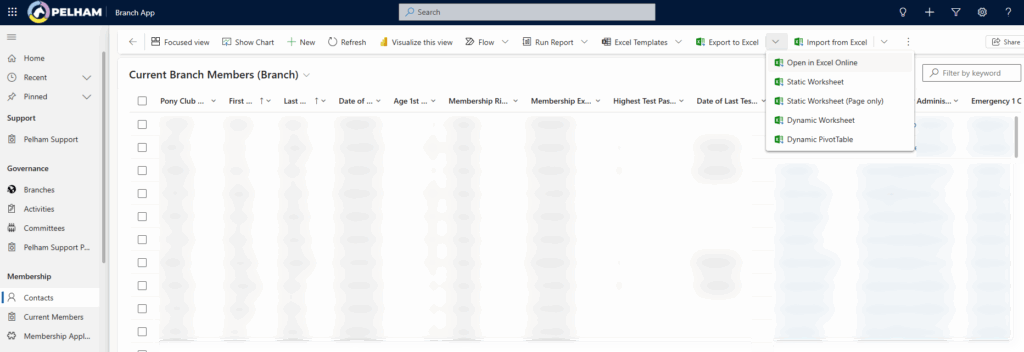
2 – You will then see the ‘Export to Excel’ button in the top toolbar, from here you can select how you want the data exported. If it is not visible look for the 3 dots.
Top Tip – Working on a tablet

If you are using an iPad or other tablet and wish to export data to Excel, we recommend using the ‘Open in Excel Online’ option:

Updated on 11 November 2025

What are your Feelings

Share This Article :

  • Facebook
  • X
  • LinkedIn
  • Pinterest

Copyright © 2025 The Pony Club Registered Charity No: 1050146 | Incorporated as a Company Limited By Guarantee Registered in England No: 3072475