
Skip to content
  • Home
  • Branches
    • Branches User Guide
  • Centre Proprietors
    • Centre User Guides
  • Centre Coordinators
    • Centre Coordinators User Guides
  • Area Reps
    • Area Reps User Guide
  • User Guides
  • Events
  • Support

PELHAM Basics

3
  • Accessing PELHAM
  • Accessing PELHAM – Area Representatives
  • Accessing Pelham on Mobile & Tablet

Centres

2
  • Accessing PELHAM – Centres
  • How to view Centre Coaches

Branches

3
  • Accessing PELHAM – Branches
  • Updating Branch Committees
  • Member Approvals

Coaches and Volunteers

7
  • Coach Types
  • The Coach Agreement
  • Coach Certifications
  • Assessors
  • Adding Coach Qualifications
  • How to Deactivate a Coach Qualification
  • How to add CPD Activities

Events

7
  • Reporting on Events in PELHAM
  • Online Booking Systems
  • My Riding Life – The Pony Club
  • Horse Events – The Pony Club
  • Horse Monkey – The Pony Club
  • Entrymaster – The Pony Club
  • Adding a new event

Achievements

3
  • Achievements – Basics
  • Deactivating Achievments
  • Achievements – Bulk Upload

Contacts

5
  • What is a Contact?
  • How to Create a Contact
  • Contacts – Membership Tab
  • Update Contact Email Address
  • Sending Emails from PELHAM

Views & Reporting

3
  • Searching and Views
  • Exporting Data from PELHAM
  • Creating a new view
View Categories
  • Home
  • Pelham Support Guides
  • Coaches and Volunteers
  • Adding Coach Qualifications

Adding Coach Qualifications

Please note: If you are updating coach qualifications you must add a new achievement history – do not update/change the dates of any existing qualifications. If you make an error and notice after saving the qualification, you will need to deactivate the qualification and add again.

The following certifications are held in PELHAM:

CRB – DBS (England & Wales), PVG (Scotland) and Access NI (N Ireland)

Safeguarding – Face to face, Online

First Aid – Face to Face, Online

How to Add Coach Qualifications

1 – Firstly, search for the contact you want to add the qualifications to, by using the search at the top of your screen. Then double click their name to go to their record:

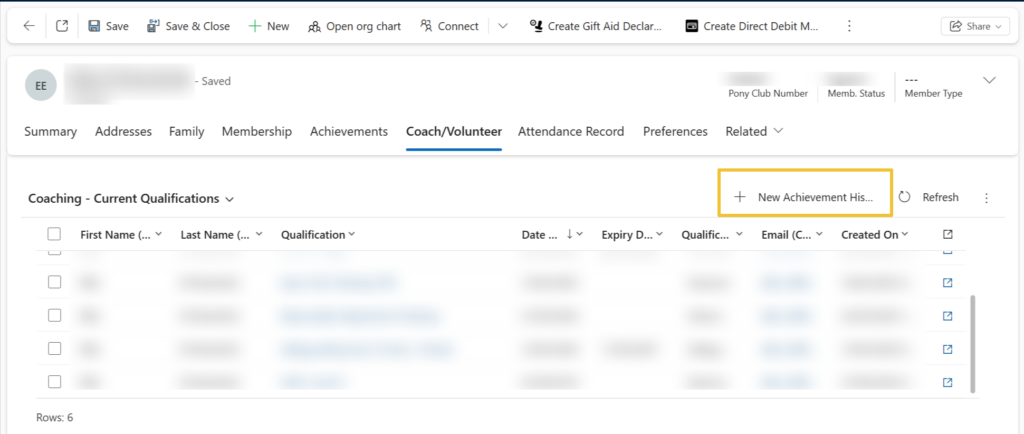
2 – From the individuals record, select the ‘Coach/Volunteer’ tab and scroll down until you reach ‘Coaching – Current Qualifications’

3 – Then select ‘New Achievement History’
4 – Search for the qualification one at a time and add the date achieved. You will notice the options to add badges here too, ignore those options and just search for coach specific qualifications.
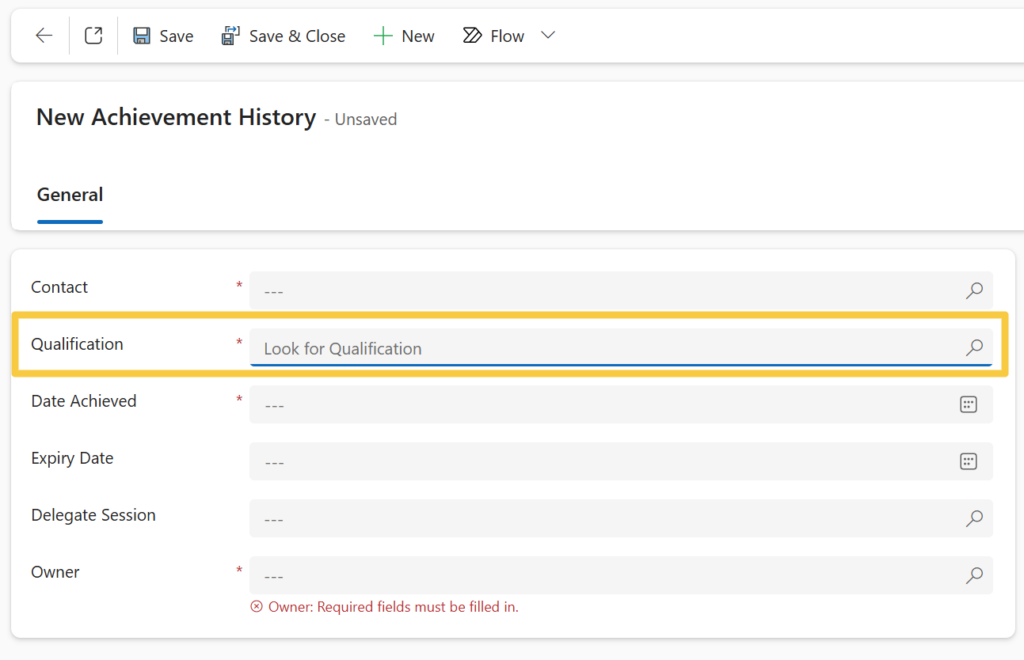
5 – Save and close this screen to add other qualifications.

Updated on 8 December 2025

What are your Feelings

Share This Article :

  • Facebook
  • X
  • LinkedIn
  • Pinterest
The Coach AgreementCoach Types

Copyright © 2025 The Pony Club Registered Charity No: 1050146 | Incorporated as a Company Limited By Guarantee Registered in England No: 3072475