How to add new Achievements
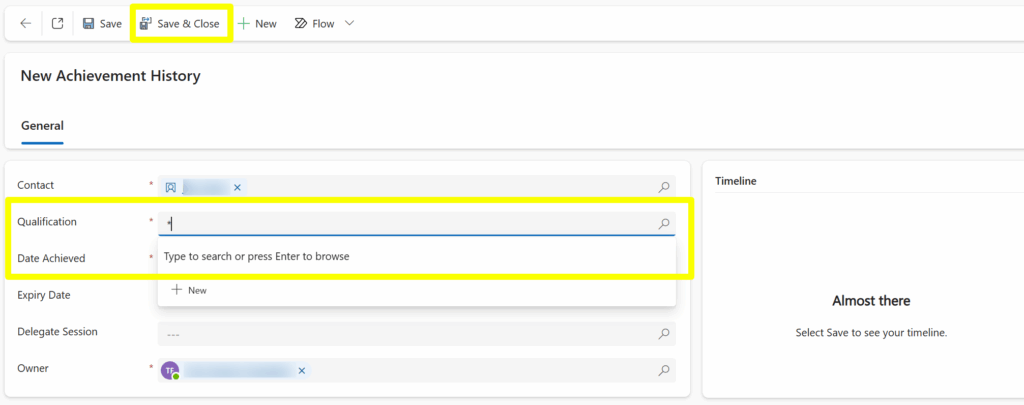
1. From the ‘Achievements’ tab click ‘+New Achievement History’ as highlighted below:
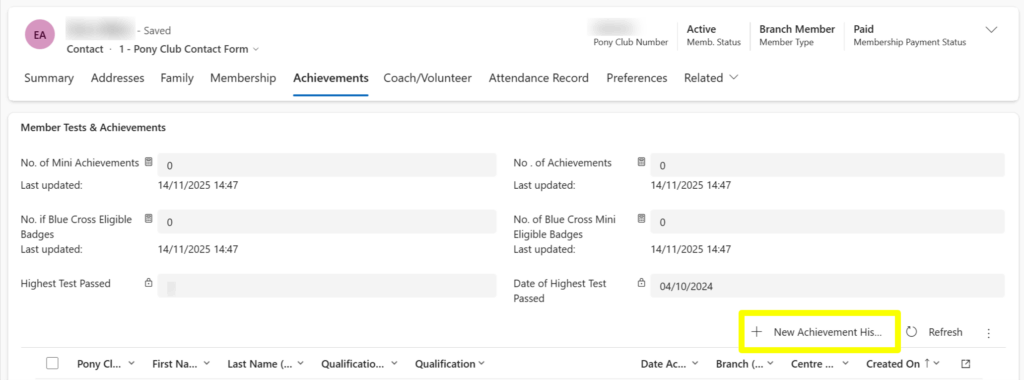
2. You will then be shown the ‘New Achievement History’ screen where you can add the achievement.
3. Fill in the Qualification and Date Achieved as highlighted below:

4. Finally Save & Close this screen.
How to deactivate an achievement
Useful if achievements have been added by mistake!
1. Firstly, you need to find the achievement you wish to remove from a contact:

2. Double click on the achievement you wish to remove.
3. The ‘New Achievement History’ screen will load with the achievement you have selected.
4. Next click ‘deactivate’ in the top of the screen as highlighted below:

5. Finally select ‘Deactivate’ and the achievement will disappear from the contacts record, if you wish to add the correct achievement you can now do so using the ‘+ New Achievement History’:
Multi Achievement Deactivation
Hint! – this can be done in ‘bulk’ if multiple achievements need to be deactivated together, by selecting the checkboxes to the left of the required achievements and then selecting deactivate, as shown below: