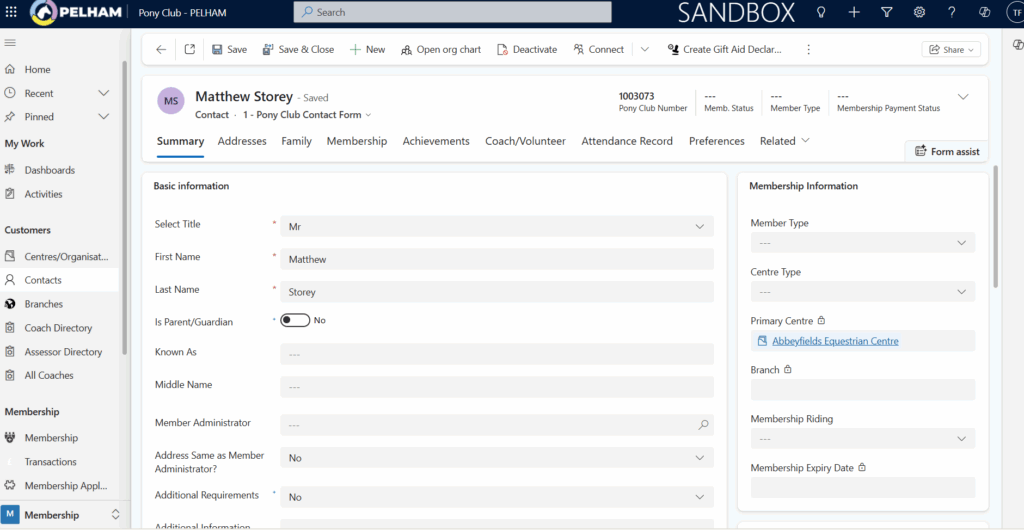
In PELHAM, every person has one single Contact record. This record represents the individual, regardless of the different roles or Membership statuses they may have. Keeping one record per person ensures that all information stays consistent and only needs updating in one place.
Therefore in PELHAM, a contact may be one or multiple of the following:
Member – someone with an active Membership
Expired Member – someone with an expired Membership
Member Administrator – the parent/guardian linked to the Member(s)
Coach – someone who has the Coach Role attached
Assessor – someone who has both Coach and Assessor roles
Volunteer – someone who helps out at the Branch and has Volunteer role
Branch Official – Committee member or specific role (e.g DC) attached
Once a Contact exists, they can be assigned one or more roles (sometimes referred to as “hats”). Examples include Coach, DC, Member Administrator, or having a Membership attached.
Additional information can also be recorded against a Contact, such as badges, tests, achievements, and other activity.
This “one person, one record” approach is intentional—it avoids duplicates and ensures there is a single, reliable source of information.
TOP TIP – Wearing Multiple Hats
A single individual may have several roles at the same time.
For example, someone could be an Expired Member, a Parent of active members, and a Volunteer—and they would still have just one Contact record.Don’t create a new record if the person already exists. Instead, update their existing Contact and add the relevant role.
How to view and edit details of an existing contact
Firstly, you need to select the individual’s contact, this can be done from the main Branch Summary Page or using the search option at the top of the screen.
TOP TIP – Pony Club ID
Every person has a unique Pony Club ID. Searching with this is the quickest and most accurate way to find the right record, especially if they have a common name.
Contact Page – Summary Tab
This tab contains the following information about a contact:
- Basic information – Title, First Name, Surname, DOB etc
- Contact Details
- Emergency Contact Information
- Email Address
- Membership Information